


A useful command-line program has to behave well when nobody is watching it. Someone will put it in a scheduled job, redirect its output, give it a filename containing spaces, or run it against a spreadsheet export that changed overnight. DeepSeek can help you examine those situations before they become production surprises. The practical approach is to write an observable contract, implement a small program, and test that contract through real child processes.
This tutorial builds stock-report, a Python standard-library tool that validates an inventory CSV, totals its quantities, and lists low-stock products. You will design its arguments, distinguish reports from diagnostics, choose useful exit statuses, and replace an output file without truncating the previous report early. The downloadable lab contains the complete program, fixtures, and offline tests. The examples below come from that implementation and its tests; the prompts are suggested review exercises, not transcripts of model responses.
No DeepSeek API account, API key, paid call, or network connection is needed to run the lab. The implementation and supplied test suite were executed with Python 3.12.14 and Python 3.13.5 on Linux. The code is written using features available in Python 3.10 and later, but these two successful runs do not establish compatibility with every supported Python release or certify Windows behavior. If you adopt it for another environment, run the supplied tests there and review any platform-dependent skips.
Start with the person or program consuming the result
Imagine a small workshop with an inventory export containing pens, notebooks, and mugs. Its operations coordinator wants a readable morning summary. A second script wants the same information as JSON. Both consumers need to know whether the input was valid. A plausible-looking total from a partially processed file could lead someone to order the wrong stock, so silently skipping bad rows is an unacceptable default for this particular task.
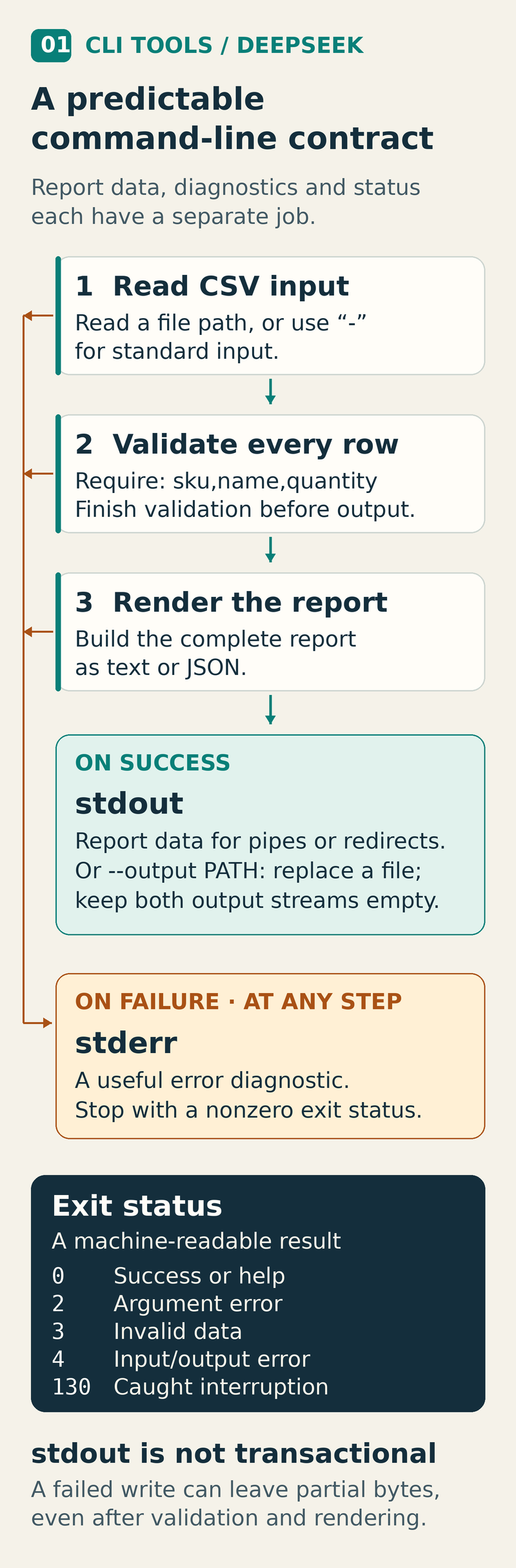
That scenario determines the central rule: validate every record before producing a report. The text view can be convenient for people, while the JSON view has stable fields for another program. Neither view contains progress chatter. If the input is invalid, the program emits a diagnostic on standard error and returns a nonzero status. The caller can decide whether to alert a person, stop a larger job, or keep yesterday’s report.
The interface is deliberately small. One required positional argument identifies the CSV source. A single dash means standard input. The output defaults to standard output, with an optional path for file replacement. The low-stock threshold is inclusive, so a threshold of two includes a product with exactly two units. The default text format is convenient for an interactive first run; automated consumers should explicitly request JSON instead of depending on that default.
INPUT: a CSV path, or-for UTF-8 standard input--format text|json: report representation; defaulttext--low-stock N: include quantities less than or equal to N; default2--output PATH: replace a report file only after successful validation and writing; default-means standard output--help: show usage and return success without reading inventory
These decisions leave out potentially useful features on purpose. There is no automatic delimiter detection, currency conversion, database connection, or network lookup. There is no switch that turns invalid records into warnings. Each of those would introduce another policy decision and another set of failure modes. First make the single-export workflow dependable. Add capabilities when an actual caller needs them and can describe what a failure should mean.
Use DeepSeek to challenge the contract
A broad request such as “make me a professional Python CLI” leaves the model to invent assumptions about data, platforms, dependencies, and error handling. A better request supplies the intended consumers and asks for unresolved decisions before implementation. That gives you an opportunity to catch a dangerous suggestion, such as opening the final output file for writing before the input has been validated, while it is still a design choice rather than a debugging session.
Review this CLI contract before proposing code.

Tool: stock-report. Python standard library only.
Input: one UTF-8 CSV path, or - for stdin.
Header: exactly sku,name,quantity.
All rows must validate before any report is emitted.
Output: --format text|json; optional --output PATH.
A failed input or temporary-file write must not truncate
an existing output file.

Identify ambiguous behaviors and propose testable decisions.
Separate argument errors, invalid data, and filesystem errors.
Do not add a network call, dependency, or auto-repair feature.
The prompt above is an author-written exercise. It does not establish that a model found any particular bug or that an implementation is correct. Treat the response as a list of candidate questions. For example, “Should duplicate product identifiers be aggregated?” is useful; an unrequested decision to aggregate them is not sufficient. In this lab, each row represents one SKU in one snapshot, so duplicates are rejected rather than combined.
You can use a DeepSeek chat interface or a coding environment configured for DeepSeek to discuss the design. If you separately automate that conversation with its API, consult the current official setup documentation for supported configuration. Keep that integration separate from the inventory program. The final command should not need an AI service to add three integers, and a model-service outage should not prevent a previously tested local report from running.
Before sharing examples with an external service, replace real product identifiers and names with synthetic fixtures. Inventory can reveal sales patterns, supplier relationships, or unreleased products even when it contains no customer names. Send the smallest example that reproduces the problem, along with the relevant function and expected behavior. The site’s DeepSeek privacy and data-minimization guide covers the broader preparation workflow. The fixture in this lesson is invented and suitable for local experimentation.
Let argparse handle syntax and keep domain rules explicit
The parser defines the public shape of the command. It accepts a source string, restricts the output format to two choices, and converts the threshold through a dedicated validator. The implementation disables abbreviated long options. Without that decision, an abbreviation that happens to be unambiguous today can become ambiguous after a future option is added. Requiring complete option names makes saved job definitions easier to reason about over time.
def parser() -> argparse.ArgumentParser:
    p = argparse.ArgumentParser(
        prog="stock-report", allow_abbrev=False,
        description="Validate a UTF-8 inventory CSV and summarize stock.",
    )
    # Python 3.14 supports colored help. Keep process output plain across versions.
    if hasattr(p, "color"):
        p.color = False
    p.add_argument("input", help="CSV path, or - for UTF-8 stdin")
    p.add_argument("--format", choices=("text", "json"), default="text",
                   help="report format (default: text)")
    p.add_argument("--low-stock", type=threshold_argument, default=2, metavar="N",
                   help="include quantities <= N (default: 2)")
    p.add_argument("--output", metavar="PATH", default="-",
                   help="replace PATH on success, or - for stdout (default)")
    return p
Notice that the source and destination remain names during argument parsing. The parser does not open the output path. That ordering is important: constructing a writable file object as part of parsing can create or truncate a file before the application has checked the input. Here, argument parsing determines intent, validation determines whether a report can be produced, and the final output stage performs the actual write.
The threshold uses the same numeric grammar as a stock quantity. It accepts a plain ASCII decimal integer between zero and one billion. Signs, leading zeros, decimal points, exponent notation, and surrounding whitespace are rejected. That may be stricter than some users expect, but it is explicit and easy to test. A different application could accept more representations; the important requirement is that its help, validator, and tests agree.
For a filename beginning with a dash, place the option terminator before the positional filename. The command below is included in the tests. A path such as ./-inventory.csv is another way to avoid confusing a filename with an option. Spaces in paths are handled by passing the filename as one argument, which means quoting it appropriately in your shell rather than adding ad hoc splitting logic to Python.
python stock_report.py --format json -- -inventory.csv
python stock_report.py "warehouse stock.csv" --format json
The help path returns zero and writes usage to standard output. Invalid arguments return two and write their explanation to standard error. Those behaviors are supplied by argparse and checked at the process boundary. The demo also disables parser coloring when that capability is available, so newer Python versions do not introduce terminal escape sequences into captured help. The tests do not freeze every character of the help layout because wrapping and wording can vary between interpreter releases.
Write the inventory schema down before validating it
After CSV decoding, the three header fields must be exactly sku, name, and quantity, in that order and with that spelling. CSV-quoted equivalents of those field names are accepted. There must be three fields in every subsequent record. A blank line is treated as a malformed record, while a file containing only the valid header represents an empty inventory. An entirely empty file is rejected because it does not establish which schema the producer intended. These distinctions are small enough to miss in a casual review and important enough to give separate tests.
SKUs contain one to thirty-two characters. The first must be an uppercase ASCII letter or digit; subsequent characters may also include underscore and hyphen. Every SKU must be unique within the file. This is a teaching schema, not a claim that all inventory identifiers should look this way. If your supplier uses lowercase letters or a different identifier system, change the written contract and its tests together rather than silently uppercasing data during import.
Names may contain one to one hundred twenty Unicode characters, with no surrounding whitespace. Unicode C-category characters are rejected, as are Unicode line and paragraph separators. This excludes control characters, format characters, surrogates, private-use characters, and unassigned code points. It is intentionally conservative for a small terminal-oriented tool; some legitimate writing systems or product labels may need characters this rule excludes. If that matters for your catalog, narrow the rule deliberately and recheck the output behavior.
Quantities are nonnegative whole numbers with a maximum of one billion per row. The code rejects a negative quantity instead of interpreting it as a return, reservation, or adjustment. It rejects a fractional quantity instead of rounding it. Those interpretations belong to a business model that this inventory snapshot does not contain. The maximum also bounds numeric conversion, and the canonical decimal spelling avoids accepting visually similar Unicode digits or several textual forms of the same number.
The lab accepts at most one hundred thousand data records and sets a CSV field-size limit of ten thousand characters. The tighter name and SKU limits are still checked after parsing. These limits provide understandable failure points for ordinary exports; they are not a complete defense against malicious resource exhaustion. A parser can encounter a very long physical line before rejecting a field, and the application retains a set of identifiers plus its low-stock list in memory.
HEADER = ["sku", "name", "quantity"]
MAX_QUANTITY = 1_000_000_000
MAX_ROWS = 100_000

def quantity_value(value: str) -> int:
    if not QUANTITY.fullmatch(value) or int(value) > MAX_QUANTITY:
        raise ValueError("expected an integer from 0 to 1000000000 without signs or leading zeros")
    return int(value)
The program uses Python’s CSV reader with strict parsing enabled, then applies its own schema rules. The CSV library handles delimiters and quoting; the application checks business meaning. Strict mode should not be described as a universal certification against every CSV dialect or every interpretation of a CSV standard. The accepted language is the configured Python reader plus the explicit constraints above. A semicolon-delimited export will fail the header check rather than trigger a guess about its dialect.
Error locations include both a logical record number and the physical line where the reader finished that record. Those values differ when quoted data contains a newline. This schema rejects newlines inside product names, but the CSV reader must still parse such a record before the domain validator can reject it. Giving both locations makes the explanation more useful without pretending that a CSV record always occupies one physical line.
Make file input and piped input obey the same encoding rule
An inventory export can look correct in a spreadsheet and still fail in a terminal because of encoding. This tool defines its input bytes as UTF-8 and accepts an optional UTF-8 byte-order mark at the very beginning. It uses the utf-8-sig decoder for both named files and standard input. That removes an initial BOM before header comparison. A BOM in the middle of a file does not become a blanket exemption from validation.
Named files are opened with explicit encoding, strict decoding errors, and an empty newline setting. For standard input, the process reconfigures its text wrapper before reading. That prevents a local terminal’s default encoding from quietly changing the input contract. Invalid UTF-8 is a data error, not a request to replace undecodable bytes or guess a legacy encoding. A UTF-16 spreadsheet export must be converted intentionally before this program will accept it.
The report is UTF-8 without a BOM, with a final newline. Standard output is reconfigured explicitly so that a product name such as “Café mug” survives even when the child process inherits an ASCII output setting. Standard error uses UTF-8 with a fallback that can display otherwise unencodable characters in diagnostics. The process tests pass actual bytes through pipes, which verifies more than calling the parsing function with an already-decoded Python string.
The functions are organized for a command-line process, not as a drop-in library for arbitrary notebook streams. A notebook or test framework may replace standard streams with objects that do not provide reconfigure or a real file descriptor. If you want a reusable library, keep the parsing and rendering functions but give the library caller responsibility for decoding and output. The executable can remain the adapter that owns process-level streams.
Run the fixture and inspect an exact result
Unpack the downloadable lab into a new directory and run commands from its demo folder. Nothing needs to be installed with pip. The following fixture is supplied as fixtures/inventory.csv. Its comma-containing notebook name must be quoted, while the accented mug name tests UTF-8 handling. The rows are deliberately not ordered by their low-stock output positions, which makes the sorting behavior visible.
sku,name,quantity
PEN-01,Blue pen,12
NOTE-02,"Notebook, A5",2
MUG-03,Café mug,0
python stock_report.py fixtures/inventory.csv --format json{
"schema_version": 1,
"rows": 3,
"total_quantity": 14,
"low_stock_threshold": 2,
"low_stock": [
{
"sku": "MUG-03",
"name": "Café mug",
"quantity": 0
},
{
"sku": "NOTE-02",
"name": "Notebook, A5",
"quantity": 2
}
]
}The three quantities sum to fourteen. Two products meet the default inclusive threshold of two, and their entries appear in SKU order: MUG-03 before NOTE-02. The JSON object includes a schema version, row count, total quantity, threshold, and low-stock array. A consumer can distinguish an empty low-stock array from a failed command by checking the exit status and then parsing the report. It should never infer success merely because standard error happened to be empty.
The default text view contains the same summary. Product names are JSON-quoted inside tab-separated detail lines, so embedded quotation marks are represented explicitly. This is a readable report format, not a replacement CSV export. A downstream program should use the JSON view rather than reverse-engineering the spacing of the human-oriented view. Keeping that distinction explicit gives you room to improve human labels without unexpectedly breaking automation.
Rows: 3
Total quantity: 14
Low stock (<= 2): 2
MUG-03	0	"Café mug"
NOTE-02	2	"Notebook, A5"
Changing the threshold to zero includes only the mug. A header-only inventory produces zero rows, zero total quantity, and an empty low-stock list. The program does not invent a row for an absent product or treat missing inventory as proof of zero stock. A producer that accidentally omits a product could still supply a valid file, so schema validation alone cannot establish completeness relative to yesterday’s inventory or a master product catalog.
Sorting the low-stock list makes repeated runs easier to compare even when the source rows arrive in a different order. It also reduces noise in version-controlled sample outputs and regression tests. Determinism here comes from ordinary code: explicit field construction, integer arithmetic, a defined sort key, and a final newline. DeepSeek does not need to participate in the reporting path, and model-generated JSON is not used as the source of truth.
Keep standard output, standard error, and status separate
A command-line process communicates through several independent channels. Standard output carries its result. Standard error carries explanations that should not be mixed into that result. The exit status tells the caller which branch of its workflow to take. A success message such as “Loaded three products” may seem friendly at the terminal, but placing it before JSON breaks a caller that expects one JSON document. This tool therefore stays quiet except for its chosen report or an error.
- 0: report completed successfully, or help was shown
- 2: command-line arguments were invalid
- 3: input bytes, CSV syntax, or inventory records were invalid
- 4: an input/output operation or destination check failed
- 130: the application caught an interruption while performing its work
These codes are this application’s contract, not a universal meaning shared by every CLI. They let a supervising script distinguish a malformed export from a missing file or unwritable destination. Low stock is a successful report condition, so it does not produce a nonzero status. If you later need an alerting command whose status depends on inventory levels, design that behavior separately rather than changing the meaning of success for existing report consumers.
For standard output, the implementation writes and flushes the completed report inside the protected output stage. A downstream process can close its pipe early, producing a broken-pipe error. The demo treats that as an I/O failure and avoids a second broken-pipe flush during interpreter shutdown. This is a deliberate policy; another filter might choose to regard an early-closing consumer as routine. Document the choice before writing tests around it.
Full-input validation does not make standard output transactional. Once bytes enter a pipe, another process may already have consumed them. A failed write can leave a partial report in the pipe. The guarantee is narrower: invalid input produces no report bytes because validation happens before writing begins. If a caller needs a replaceable artifact that remains intact on pre-replacement failures, use the program’s output-file option rather than relying on a pipe.
Preserve the old report with a temporary sibling file
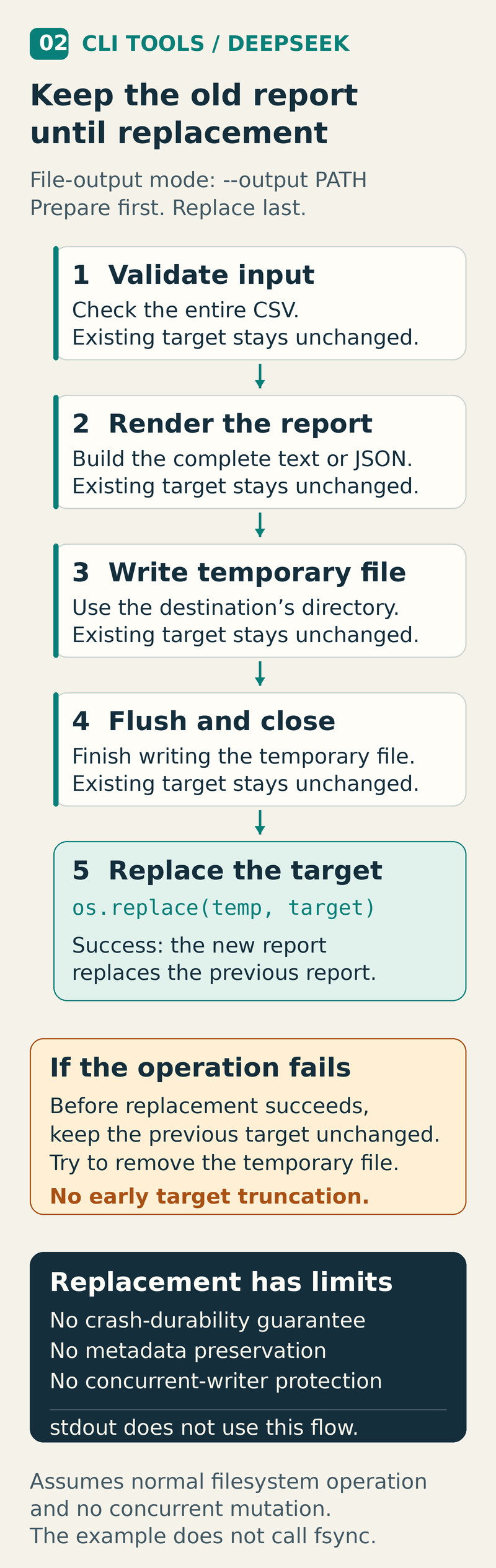
The most important file-output mistake is opening the destination in write mode before the job knows it can finish. Consider a scheduled report that overwrites yesterday’s JSON and then discovers a bad quantity near the end of today’s CSV. The old report is already gone. Storing a complete report string first avoids that early truncation, but writing the string directly to the final path can still fail halfway through.
The demo writes to a uniquely named temporary file in the destination’s directory. It flushes and closes that file, then calls os.replace to replace the destination. Placing the temporary beside its destination avoids deliberately crossing filesystems during replacement. If validation, rendering, temporary-file writing, or replacement fails before a successful replacement, the program has not intentionally overwritten the old report. Cleanup attempts to remove the temporary without obscuring the original error.
def atomic_write(destination: Path, text: str) -> None:
    temporary = None
    try:
        with tempfile.NamedTemporaryFile(
            mode="w", encoding="utf-8", errors="strict", newline="\n",
            dir=destination.parent, prefix=f".{destination.name}.",
            suffix=".tmp", delete=False,
        ) as stream:
            temporary = Path(stream.name)
            stream.write(text)
            stream.flush()
        # Close the temporary before replacement, including on Windows.
        os.replace(temporary, destination)
        temporary = None
    finally:
        if temporary is not None:
            try:
                temporary.unlink(missing_ok=True)
            except OSError:
                pass  # Best-effort cleanup must not hide the original failure.
Before creating a temporary, the program rejects an output path that is a symbolic link, an existing nonregular object, or an obvious alias of the named input. It compares resolved paths and, when the destination exists, checks whether both paths identify the same file. The tests include a hard-link alias because different path strings can refer to the same underlying file. A simple string comparison would miss that case.
Those checks are guardrails for ordinary use in a trusted directory. They are not a security boundary against someone changing directory entries between the check and replacement. The program does not lock the destination or coordinate concurrent writers. Two successful jobs can replace the same path, with the later replacement winning. When the source is standard input, it also cannot reliably identify every file that a shell or upstream process used to supply those bytes.
The replacement strategy does not promise crash durability. There is no fsync call for the file or its parent directory, and this tutorial does not test power loss, kernel crashes, unusual network filesystems, or storage-device behavior. The new file also inherits the temporary file’s metadata rather than preserving the previous destination’s permissions, ownership, extended attributes, or hard-link relationships. Decide whether those properties matter before adapting this pattern to a shared production directory.
Normal exceptions trigger best-effort temporary cleanup, but an abrupt kill or machine failure can leave a temporary behind. The prefix includes the destination’s name so an operator can recognize such files. Do not implement an indiscriminate cleanup task that deletes every similarly named file while other jobs are running. If orphan cleanup becomes necessary, define an age and ownership policy that accounts for active writers and the environment’s permissions.
Show the complete stock_report.py implementation
#!/usr/bin/env python3
"""Validate a UTF-8 inventory CSV and write a deterministic stock summary."""
from __future__ import annotations

import argparse
import csv
import json
import os
from pathlib import Path
import re
import sys
import tempfile
import unicodedata

HEADER = ["sku", "name", "quantity"]
MAX_QUANTITY = 1_000_000_000
MAX_ROWS = 100_000
MAX_FIELD_CHARS = 10_000
SKU = re.compile(r"[A-Z0-9][A-Z0-9_-]{0,31}\Z", re.ASCII)
QUANTITY = re.compile(r"(?:0|[1-9][0-9]{0,9})\Z", re.ASCII)


class DataError(ValueError):
    """The input bytes or records violate the inventory contract."""


def quantity_value(value: str) -> int:
    if not QUANTITY.fullmatch(value) or int(value) > MAX_QUANTITY:
        raise ValueError("expected an integer from 0 to 1000000000 without signs or leading zeros")
    return int(value)


def threshold_argument(value: str) -> int:
    try:
        return quantity_value(value)
    except ValueError as exc:
        raise argparse.ArgumentTypeError(str(exc)) from exc


def parser() -> argparse.ArgumentParser:
    p = argparse.ArgumentParser(
        prog="stock-report", allow_abbrev=False,
        description="Validate a UTF-8 inventory CSV and summarize stock.",
    )
    # Python 3.14 supports colored help. Keep process output plain across versions.
    if hasattr(p, "color"):
        p.color = False
    p.add_argument("input", help="CSV path, or - for UTF-8 stdin")
    p.add_argument("--format", choices=("text", "json"), default="text",
                   help="report format (default: text)")
    p.add_argument("--low-stock", type=threshold_argument, default=2, metavar="N",
                   help="include quantities <= N (default: 2)")
    p.add_argument("--output", metavar="PATH", default="-",
                   help="replace PATH on success, or - for stdout (default)")
    return p


def summarize(stream, threshold: int) -> dict:
    csv.field_size_limit(MAX_FIELD_CHARS)
    reader = csv.reader(stream, strict=True)
    seen = set()
    total = 0
    low = []
    try:
        if next(reader, None) != HEADER:
            raise DataError("header must be exactly sku,name,quantity")
        for record_number, row in enumerate(reader, start=2):
            location = f"record {record_number} (ending at line {reader.line_num})"
            if record_number - 1 > MAX_ROWS:
                raise DataError(f"{location}: more than {MAX_ROWS} data records")
            if len(row) != 3:
                raise DataError(f"{location}: expected 3 fields, got {len(row)}")
            sku, name, raw_quantity = row
            if not SKU.fullmatch(sku):
                raise DataError(f"{location}: invalid sku")
            if sku in seen:
                raise DataError(f"{location}: duplicate sku {sku!r}")
            if (not 1 <= len(name) <= 120 or name != name.strip()
                    or any(unicodedata.category(c).startswith("C") or unicodedata.category(c) in {"Zl", "Zp"} for c in name)):
                raise DataError(f"{location}: name must contain 1-120 characters, with no surrounding whitespace, Unicode C-category characters, or line/paragraph separators")
            try:
                quantity = quantity_value(raw_quantity)
            except ValueError as exc:
                raise DataError(f"{location}: invalid quantity; {exc}") from exc
            seen.add(sku)
            total += quantity
            if quantity <= threshold:
                low.append({"sku": sku, "name": name, "quantity": quantity})
    except csv.Error as exc:
        raise DataError(f"CSV syntax or field-size error near line {reader.line_num}: {exc}") from exc
    low.sort(key=lambda item: item["sku"])
    return {"schema_version": 1, "rows": len(seen), "total_quantity": total,
            "low_stock_threshold": threshold, "low_stock": low}


def read_report(source: str, threshold: int) -> dict:
    if source == "-":
        sys.stdin.reconfigure(encoding="utf-8-sig", errors="strict", newline="")
        return summarize(sys.stdin, threshold)
    with Path(source).open("r", encoding="utf-8-sig", errors="strict", newline="") as stream:
        return summarize(stream, threshold)


def render(report: dict, output_format: str) -> str:
    if output_format == "json":
        return json.dumps(report, ensure_ascii=False, indent=2) + "\n"
    lines = [f"Rows: {report['rows']}",
             f"Total quantity: {report['total_quantity']}",
             f"Low stock (<= {report['low_stock_threshold']}): {len(report['low_stock'])}"]
    # JSON quoting prevents product names from changing the text record layout.
    lines.extend(f"{item['sku']}\t{item['quantity']}\t{json.dumps(item['name'], ensure_ascii=False)}"
                 for item in report["low_stock"])
    return "\n".join(lines) + "\n"


def check_destination(destination: Path, source: str) -> None:
    if destination.is_symlink():
        raise OSError("output must not be a symbolic link")
    if destination.exists() and not destination.is_file():
        raise OSError("output must be a regular file or a new path")
    if source != "-":
        original = Path(source)
        try:
            same_path = destination.resolve() == original.resolve()
        except RuntimeError as exc:  # Python 3.12 and earlier: symlink loops.
            raise OSError("cannot resolve input/output path") from exc
        if same_path:
            raise OSError("input and output must be different files")
        if destination.exists() and destination.samefile(original):
            raise OSError("input and output must be different files")


def atomic_write(destination: Path, text: str) -> None:
    temporary = None
    try:
        with tempfile.NamedTemporaryFile(
            mode="w", encoding="utf-8", errors="strict", newline="\n",
            dir=destination.parent, prefix=f".{destination.name}.",
            suffix=".tmp", delete=False,
        ) as stream:
            temporary = Path(stream.name)
            stream.write(text)
            stream.flush()
        # Close the temporary before replacement, including on Windows.
        os.replace(temporary, destination)
        temporary = None
    finally:
        if temporary is not None:
            try:
                temporary.unlink(missing_ok=True)
            except OSError:
                pass  # Best-effort cleanup must not hide the original failure.


def diagnose(message: str) -> None:
    print(f"stock-report: error: {message}", file=sys.stderr)


def main(argv=None) -> int:
    sys.stdout.reconfigure(encoding="utf-8", errors="strict", newline="\n")
    sys.stderr.reconfigure(encoding="utf-8", errors="backslashreplace", newline="\n")
    try:
        try:
            args = parser().parse_args(argv)
        except SystemExit:
            # Detect a broken help pipe before interpreter-shutdown flushing.
            sys.stdout.flush()
            sys.stderr.flush()
            raise
        report = read_report(args.input, args.low_stock)
        text = render(report, args.format)
        if args.output == "-":
            sys.stdout.write(text)
            sys.stdout.flush()
        else:
            destination = Path(args.output)
            check_destination(destination, args.input)
            atomic_write(destination, text)
        return 0
    except UnicodeError:
        diagnose("input must be valid UTF-8 (an initial UTF-8 BOM is accepted)")
        return 3
    except DataError as exc:
        diagnose(str(exc))
        return 3
    except BrokenPipeError:
        # Prevent a second flush of a broken stdout during interpreter shutdown.
        with open(os.devnull, "wb") as sink:
            os.dup2(sink.fileno(), sys.stdout.fileno())
        diagnose("output pipe closed")
        return 4
    except OSError as exc:
        diagnose(f"I/O failure: {exc}")
        return 4
    except KeyboardInterrupt:
        diagnose("interrupted")
        return 130


if __name__ == "__main__":
    raise SystemExit(main())
Understand what your shell does before Python starts
There is an important difference between the program’s output option and shell redirection. In a POSIX-style shell, redirecting standard output with a single greater-than sign normally opens and truncates the target before Python begins running. If the program later rejects the CSV, the shell has already affected that file. The application’s temporary-file logic cannot undo a write that happened outside its own process.
# The program controls replacement of this file:
python stock_report.py fixtures/inventory.csv --format json --output report.json

# In a POSIX-style shell, the shell controls this redirection:
python stock_report.py fixtures/inventory.csv --format json > report.json
Use the first command when preserving a previous report matters. On success, both standard streams are empty and the destination contains the JSON report. Parent directories are not created automatically; a missing destination directory is an I/O error. That makes a misspelled path visible instead of quietly building a new directory tree in an unintended location. If automatic directory creation is a real requirement, add it as an explicit design decision with tests.
Shell syntax also affects how you inspect return codes and pipelines. The Python process tests below avoid those differences by passing an argument list directly to the interpreter. They do not use shell=True, depend on a Unix cat command, or interpolate a filename into a command string. This keeps the executable’s behavior separate from shell quoting, pipeline-status settings, and the availability of operating-system utilities.
Test the executable as its callers will run it
Unit tests of the CSV parser are helpful, but they cannot prove that the executable writes diagnostics to the right stream or returns the promised status. The lab launches a fresh Python process for each scenario. It captures standard output and standard error separately, supplies input as bytes, and sets a timeout. The same interpreter running the test suite launches the program, which avoids accidentally testing a different Python installation on the search path.
result = subprocess.run(
    [sys.executable, str(SCRIPT), "-", "--format", "json"],
    input=GOOD,
    capture_output=True,
    timeout=10,
    check=False,
)
assert result.returncode == 0
assert result.stderr == b""
assert json.loads(result.stdout) == EXPECTED
The helper leaves check disabled because nonzero statuses are expected results in many tests. Each test then asserts the status it intended to exercise. Successful JSON tests parse the returned bytes and compare the resulting object against a literal expected dictionary. Text tests compare the full UTF-8 output. Invalid-data tests require empty standard output, a diagnostic prefix, and no traceback. The assertions describe an external contract rather than the internal names of helper functions.
Run the suite with the command below from the lab’s demo directory. The supplied suite completed thirty-six unittest test methods with no failures or skips on each of the two stated Python versions in the Linux environment. Several methods also exercise multiple subcases, such as invalid quantity spellings and header variants. The number is a description of this run, not a coverage percentage or a claim that every possible filesystem failure has been simulated.
python -m unittest discover -s tests -v

Ran 36 tests
OK
The test selection follows risk rather than just the happy path. It includes missing arguments, an invalid format, disabled option abbreviations, input paths with spaces, dash-prefixed filenames, BOM-bearing input, CRLF line endings, invalid UTF-8, and UTF-16 rejection. It also checks duplicate identifiers, malformed quoting, field counts, numeric boundaries, name restrictions, the record cap, and the field-size cap. These cases are useful review material because each corresponds to a visible decision in the contract.
Output tests begin with a real existing file containing known bytes. They then exercise successful replacement and failure paths, reading the destination afterward to verify its contents. The same-file, hard-link, and symbolic-link tests check that protective rules are actually enforced. On an operating system where link creation is unavailable, those tests report a skip rather than silently pretending the scenario was covered. Inspect the skip count when you run the suite elsewhere.
Inject write failures without pretending to test the hardware
Waiting for a disk to fill during a test is unreliable and can damage the surrounding environment. Instead, two tests run the program in a child process with a narrowly substituted operation. One makes the replacement call raise an I/O exception. The other writes a small prefix to a real temporary file and then raises an exception. Both start with an existing destination, require status four, and verify that its original bytes remain unchanged.
The second scenario matters because a failure before any temporary file is created says little about partial writes. Here, the temporary really exists and receives bytes before the injected failure. The context manager closes it and cleanup removes it. The test then checks for leftover temporary files with the expected prefix. This supplies evidence for the application’s control flow without claiming that a simulated exception reproduces every possible disk-full or network-filesystem condition.
The broken-pipe test uses an actual pipe. It closes the parent’s reading end before supplying input to the child and verifies the child’s I/O failure status and diagnostic. A separate interruption test substitutes an operation that raises KeyboardInterrupt. That verifies the exception branch, but it is not a test of real terminal signal delivery. Distinguishing these two kinds of evidence helps keep a tutorial’s reliability claims proportionate to what was executed.
Try the supplied invalid-quantity fixture as a worked failure. Its last quantity is 2.5. The process returns three, produces no report on standard output, and writes the diagnostic below to standard error. The record number points to the third CSV record, counting the header. If you also provide an existing output path, the application never reaches the file-writing stage, so that file retains its previous contents.
python stock_report.py fixtures/invalid_quantity.csv --format json

stock-report: error: record 3 (ending at line 3): invalid quantity; expected an integer from 0 to 1000000000 without signs or leading zeros
Do not write a test that merely expects “some exception” or “any nonzero result.” A missing fixture, syntax error, or accidental import failure could satisfy that assertion while the intended validation is broken. Check the relevant diagnostic, preserve the stream separation, and compare the destination bytes when file safety is the concern. The more specific the expected behavior, the harder it is for an unrelated failure to masquerade as a passing test.
Give DeepSeek evidence and request a focused revision
Once the baseline tests pass, ask DeepSeek to inspect one boundary at a time. A focused review can compare the written contract with the implementation and identify a missing scenario without proposing an unrelated architecture. Include the relevant function, the test that covers it, and the exact observed result. The site’s DeepSeek code-review tutorial provides a broader structure for turning observations into reviewable changes.
Review only output-file safety in this implementation.

Contract: validate and render before touching the destination;
write a same-directory temporary, close it, then replace.
An existing report must survive failures before replacement.
We do not promise crash durability, metadata preservation,
locking, or safety against hostile directory mutation.

For each finding, give:
1. The smallest input or filesystem setup that exposes it
2. The incorrect observable behavior
3. A regression-test assertion
4. A minimal patch, only if the contract requires it

Do not claim the tests passed unless you actually ran them.
If the model suggests a change, first decide whether it repairs the existing contract or changes the contract. Accepting negative quantities, creating output directories, and treating broken pipes as success are policy changes even if their patches are short. A genuine implementation repair should usually be accompanied by a failing regression test that becomes green after the patch. Keep the fixture small enough that another reader can understand the failure without trusting a long explanation.
DeepSeek’s JSON-output feature concerns the format of a model response. It does not establish that proposed Python code is correct or that a returned test report is truthful. The official guide also describes setup requirements and possible empty output. If you use structured model responses to collect review findings, validate that response separately and still execute the actual program tests yourself. The stock-report JSON in this lab is generated locally by Python from validated inventory data.
After example-based tests are stable, consider properties that should hold across many generated inventories. Permuting valid rows should preserve the summary. Raising the threshold should never remove an item from the low-stock list. Adding a unique zero-quantity row should increase the row count without changing the total quantity. These are proposed next exercises, not additional tests claimed in the supplied run. The property-based testing lesson explains how to extend that approach.
Know what remains outside the tool’s promise
A syntactically valid inventory can still be stale, incomplete, or wrong. This program does not compare warehouse counts with purchase orders, establish who produced the file, or detect a product omitted upstream. It cannot tell whether a negative number would have represented a legitimate accounting adjustment in another schema. Treat its success status as evidence that the supplied snapshot met this contract and was summarized successfully, rather than evidence about the physical state of a business.
The implementation is intended for moderate local exports and trusted working directories. It stores identifiers and low-stock records in memory, holds the rendered report as a string, and does not stream a huge JSON array while reading. Those choices support the all-input-first rule and make failure behavior easier to inspect. For larger datasets, you may need a staging database or external sort, but the design still needs a clear boundary between validation, publication, and failure recovery.
Deployment adds questions that a short tutorial cannot answer for your environment. Who owns the output directory? May multiple jobs run together? Must a replacement retain a group-readable mode? Is the path on local storage or a network mount? What should happen if yesterday’s report exists but today’s run fails? Answer those operational questions before calling the script production-ready, and test the relevant filesystem and interpreter rather than relying only on a successful local demonstration.
The useful outcome is a command whose behavior you can explain and verify: arguments define intent, validated input produces one deterministic report, diagnostics stay out of the data stream, statuses identify failure classes, and file replacement waits until a complete temporary is ready. DeepSeek can help interrogate those decisions and propose cases you missed. The authority comes from the written contract, the executable code, and the observed tests that connect them.
Sources and References
The following primary documentation was checked on October 5, 2026. The implementation, fixtures, prompts, and test scenarios in this tutorial are original teaching material. Documentation supports the library and service behavior discussed above; the downloadable test results describe the specific offline execution performed for this lesson.
- Python argparse documentation: parser options, help, invalid arguments, and long-option abbreviation
- Python csv documentation: reader behavior, strict mode, field-size limits, newline handling, and line numbers
- Python pathlib documentation: explicit file opening, path resolution, and same-file checks
- Python subprocess documentation: child-process execution, captured streams, timeouts, and return codes
- Python UTF-8 signature codec documentation: decoding an initial UTF-8 BOM
- Python tempfile documentation: named temporary files and cleanup behavior
- Python os.replace documentation: replacing a destination and filesystem constraints
- Python TextIOWrapper reconfigure documentation: explicit text-stream encoding, error handling, and newline configuration
- GNU Bash redirection documentation: shell-controlled output opening and truncation
- DeepSeek official API setup documentation: current service configuration and integration examples
- DeepSeek official JSON Output guide: structured-response configuration and documented limitations

[…] deterministic for ordinary input mappings. If you later add a command-line interface, the related guide to DeepSeek-assisted Python CLI tools provides a separate starting point for that interface. Its behavior should be tested without […]
[…] Python CLI tools guide introduces sibling-temporary-file replacement for an output command. This article extends that […]