


A Python program that launches another program crosses a boundary your type checker cannot fully describe. A filename can arrive as the wrong argument. A successful command can write warnings. A failed command can leave useful output behind. A command that usually finishes immediately can wait for input, stall, or keep producing data until its parent runs out of memory. Reviewing the line that calls subprocess.run is only the beginning.
This tutorial uses DeepSeek as a proposed reviewer of a small, local subprocess wrapper. The practical goal is to turn broad advice into specific tests: preserve argument boundaries, distinguish exit statuses, handle timeouts, and make text decoding deliberate. You can complete the local lab without an API key, a network connection, or a model response. The review prompts are examples to try yourself; this article does not report a live DeepSeek evaluation, a model comparison, or measured improvements from AI assistance.
The most useful deliverable is a compact contract that another developer can check. Given a trusted executable and a small, controlled child process, what input does your wrapper accept? What does it return after normal completion? Which failures escape as exceptions? Which responsibilities remain with the caller? Once those questions have written answers, both a human reviewer and a model have something concrete to challenge.
1. Give the wrapper a small, explicit contract
Our example interface is run_tool(argv, cwd=None, timeout=2). It accepts a nonempty list or tuple of strings, requires a nonempty executable argument, rejects NUL characters in every argument, and validates that the timeout is a positive, finite built-in integer or float. Booleans and other numeric types are rejected. The command runs with shell=False and stdin=DEVNULL, captures stdout and stderr separately, and uses UTF-8 text decoding with strict error handling. A normally completed child produces a CompletedProcess; the caller inspects its return code. The wrapper deliberately uses check=False.
Write that contract above the implementation before discussing conveniences. It gives the review a fixed target. Returning only stdout would lose information the caller needs. Catching every exception and returning an empty string would make several different failures indistinguishable. Automatically retrying a timed-out command could duplicate its side effects. Those changes might belong in some application, but each would require a new contract and additional tests.
The interface is intentionally narrower than everything Python’s subprocess library accepts. For this tutorial, strings are the argument format, finite numbers are the timeout format, and a short-lived trusted command is the execution model. Narrowing an interface can make mistakes easier to detect, provided the restriction is documented. It does not make the launched executable trustworthy or turn a generic command runner into an isolation boundary.
Two seconds is a demonstration default rather than a production recommendation. A formatter processing one small file and a compiler processing an entire repository need different budgets. Choose the real timeout from the operation’s requirements and the surrounding workflow, then test the configured value. Avoid presenting a single number as a universal reliability setting.
"""A small synchronous runner for trusted, finite-output subprocess exercises."""

import math
import os
import subprocess


def run_tool(
    argv: list[str] | tuple[str, ...],
    cwd: str | os.PathLike[str] | None = None,
    timeout: int | float = 2,
) -> subprocess.CompletedProcess[str]:
    """Run an argument vector; return all exit codes and propagate other failures.

    This is not a sandbox or an output-limited process supervisor. The caller
    must select a trusted executable, understand its arguments, and know that
    its output fits in memory. ``cwd`` is delegated to ``subprocess.run``.
    """
    if not isinstance(argv, (list, tuple)):
        raise TypeError("argv must be a list or tuple of strings")
    if not argv:
        raise ValueError("argv must not be empty")
    if any(not isinstance(arg, str) for arg in argv):
        raise TypeError("every argument must be a string")
    if not argv[0]:
        raise ValueError("the executable must not be empty")
    if any("\0" in arg for arg in argv):
        raise ValueError("arguments must not contain NUL characters")
    if type(timeout) not in (int, float):
        raise TypeError("timeout must be an int or float, excluding bool")
    if timeout <= 0 or (type(timeout) is float and not math.isfinite(timeout)):
        raise ValueError("timeout must be positive and finite")

    return subprocess.run(
        tuple(argv),
        cwd=cwd,
        shell=False,
        stdin=subprocess.DEVNULL,
        capture_output=True,
        text=True,
        encoding="utf-8",
        errors="strict",
        timeout=timeout,
        check=False,
    )
2. Tell DeepSeek what kind of review you want
A vague request to make subprocess code safe invites an oversized answer. The model might introduce asynchronous execution, custom result classes, shell quoting helpers, retries, logging, or process groups. Each addition increases the amount of behavior you must understand. Start with a narrower request: inspect this implementation against this contract, identify concrete mismatches, and propose the smallest tests that would expose them.
Include the function and its tests together. A code-only review can flag a risk without recognizing that the surrounding application already handles it. A test-only review can endorse assertions that describe the wrong behavior. State the operating systems you intend to support, whether the executable is chosen by the application, and whether child output is known to be small. Mark anything you do not yet know as an open requirement.
DeepSeek’s official chat-completions documentation describes sending a conversation to obtain a model response. That interaction is sufficient for this review workflow. No particular model name, tool-calling feature, subscription tier, or current pricing assumption is needed here. If you choose to submit code through a hosted service, first remove secrets and confirm that your organization’s rules permit sharing the material.
Review the following Python subprocess wrapper and tests against the stated contract. Separate confirmed defects from assumptions and optional improvements. For each defect, identify the relevant expression, explain an observable failure, and propose one minimal standard-library test. Preserve the synchronous interface, argument sequences, shell=False, strict UTF-8 decoding, and check=False. Do not claim to have executed anything. Do not add dependencies, retries, or process-tree management.
Read the response as a set of proposals. An explanation can sound persuasive while overlooking a type conversion or platform detail. Accept a finding only after you can reproduce it, connect it to an explicit requirement, or verify the relevant documented behavior. Keep the test even when you reject the suggested patch: it may preserve an important decision for the next review.
3. Build fixtures that control the uncertainty
Use the current Python interpreter as the child executable and pass a short, fixed program with -c. This keeps the lab independent of optional command-line tools. You do not need a particular version of an image converter, a network client, a shell utility, or a package manager. The child program itself defines the output and exit condition that the test intends to observe.
sys.executable identifies the interpreter in ordinary Python installations, although Python documents environments where it can be empty or unavailable. Check that the lab has a usable interpreter path before relying on it. A test that quietly substitutes the word python can select a different installation from the one running the parent, undermining the point of the fixture.
Keep the child source constant. Its purpose is to simulate a tool, not to provide an execution service for user-supplied Python. Put variable test values in the child’s argument list and inspect them through sys.argv. Interpolating a filename into the program text would introduce a second parsing problem and make it harder to tell whether the wrapper or the fixture caused the failure.
Choose one behavior per fixture. One child echoes arguments as JSON; another writes a warning; another exits with a chosen status; another sleeps. A single elaborate child controlled by many hidden switches may reduce duplicated lines, but it also creates a miniature application that needs its own review. Clarity matters more than cleverness in a boundary test.
Download the complete Python subprocess lab (ZIP), including the implementation, demonstration, tests and checksum manifest.
Save the wrapper above as subprocess_lab.py and this walkthrough as demo.py in the same directory. The downloadable lab includes both author and independent tests. Run python3 -m unittest discover -v and then python3 demo.py from that directory. The lab was checked on Linux with Python 3.12.14 and 3.13.5; other operating systems were not executed for this article.
"""Run each controlled example; every child has finite output and no descendants."""

import json
from pathlib import Path
import subprocess
import sys
import tempfile

from subprocess_lab import run_tool


def python_argv(source, *args):
    return [sys.executable, "-c", source, *args]


def main():
    expected = ["two words", "; echo nope", "$(echo nope)", "*.txt", ""]
    result = run_tool(python_argv(
        "import json,sys; print(json.dumps(sys.argv[1:]))", *expected
    ))
    print("argument roundtrip:", json.loads(result.stdout) == expected)
    print("arguments:", result.stdout.strip())

    result = run_tool(python_argv(
        "import sys; sys.stdout.buffer.write(b'caf\\xc3\\xa9\\n')"
    ))
    print("UTF-8 stdout:", repr(result.stdout))

    result = run_tool(python_argv("import sys; sys.stderr.write('notice\\n')"))
    print("successful stderr:", result.returncode, repr(result.stderr))

    result = run_tool(python_argv("import sys; print('out'); sys.exit(7)"))
    print("nonzero result:", result.returncode, repr(result.stdout))

    with tempfile.TemporaryDirectory() as directory:
        try:
            run_tool([str(Path(directory) / "absent-executable")])
        except FileNotFoundError:
            print("launch error: FileNotFoundError")

    try:
        run_tool(python_argv(
            "import sys,time; "
            "sys.stdout.buffer.write(b'begin\\n'); sys.stdout.buffer.flush(); "
            "time.sleep(5)"
        ), timeout=0.5)
    except subprocess.TimeoutExpired as error:
        print("timeout: TimeoutExpired")
        print("partial stdout (may be None):", repr(error.stdout))

    try:
        run_tool(python_argv("import sys; sys.stdout.buffer.write(b'\\xff')"))
    except UnicodeDecodeError:
        print("decode error: UnicodeDecodeError")


if __name__ == "__main__":
    main()
4. Test argument boundaries instead of visual command strings
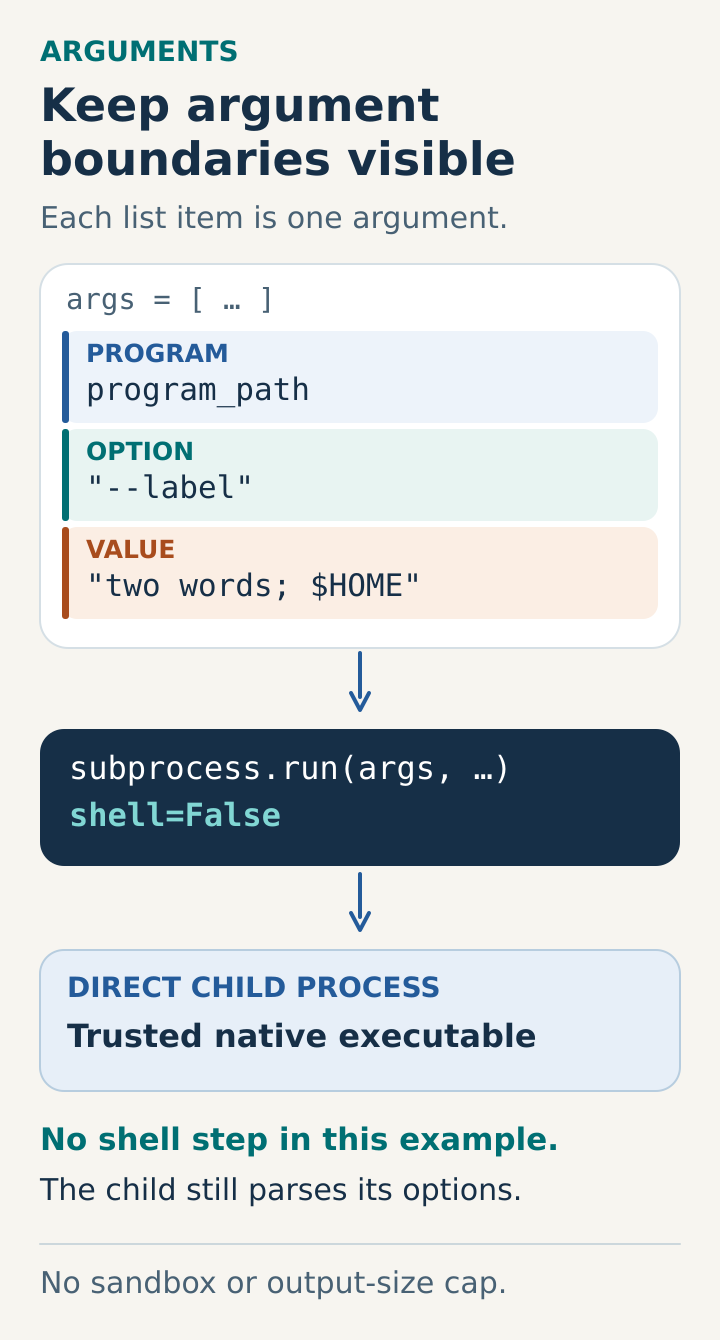
The argument test should answer a structural question: did each input element arrive as one intended argument? Give the echo fixture values containing spaces, punctuation, an empty string, a quote, and a leading hyphen. Have it serialize the arguments with JSON, then parse that JSON in the parent and compare lists. This creates an exact comparison without relying on a terminal’s display conventions.
A filename such as quarterly report.txt should occupy one list element. Adding shell-style quote characters around that value is an easy mistake when moving from terminal commands to an argument sequence. In our fixture, those quote characters become observable data. A test that merely checks whether the output contains the filename may miss the extra characters; equality catches them.
Also test the sequence itself. A plain string should fail our wrapper’s input validation, even though Python offers other ways to describe commands. An empty list should fail before process creation. An integer hidden among otherwise valid arguments should fail clearly. Keep an empty data argument distinct from an empty executable argument: the former can be meaningful, while the latter does not name the program this contract requires. Include a NUL-containing argument among the rejected inputs so that this validation rule remains visible.
Do not use a joined command string as your expected result. Joining loses the structure you are trying to preserve. It can make two different inputs look deceptively similar and encourages later code to split the representation again. Treat a human-readable command preview as a separate display feature with its own limitations, never as the authoritative record of what was passed.
5. Keep shell avoidance separate from executable trust
For this lab’s ordinary executable fixtures, an argument sequence with shell=False avoids asking a shell to interpret the command. It is still important to ask what the selected program does with each argument. A value that begins with a dash may be understood as an option. A tool may support configuration files, executable hooks, plugins, or expressions that carry their own meanings. Correct argument transport cannot decide whether those meanings are allowed.
Imagine an application that intends to inspect one user-selected file. If it lets that user replace the executable or add arbitrary options, a perfectly implemented wrapper can perform an unintended operation. The application must constrain the tool and its allowed operation before calling the wrapper. Some tools support a double-hyphen separator before positional filenames, but that convention is tool-specific. Verify it in the selected tool’s documentation rather than adding it mechanically.
An explicit path helps identify which executable you intend to launch, yet the file at that path and its surrounding installation must still be trusted. The working directory, inherited environment, and tool configuration can also affect behavior. Our lab controls its fixture source and uses a known interpreter; it does not claim to solve these deployment questions.
Windows deserves a separate review when batch files are involved. Python documents special shell-related behavior for batch files, and argument handling is platform-dependent. Do not generalize a successful Python-executable fixture into a guarantee for every executable format. If production launches a batch file, test that actual path and obtain platform-specific guidance before handling untrusted arguments.
6. Preserve stdout and stderr as separate observations
Design one fixture to write a normal result to stdout and a warning to stderr before exiting successfully. The test should verify all three observations: the expected result text, the expected warning text, and the success return code. This protects against the tempting shortcut of treating any stderr content as proof that the operation failed.
Then design the opposite case: a child that produces useful stdout, writes an error explanation to stderr, and exits unsuccessfully. The output remains useful diagnostic material even though the caller should classify the command as failed. A wrapper that returns an empty value for every failure would discard both the partial result and the explanation.
Separate streams also preserve the intended role of the information. A command may use stdout for machine-readable data while sending progress messages to stderr. Combining them can corrupt a JSON document that would otherwise parse correctly. Conversely, two separately captured strings do not establish the exact order in which messages crossed the two streams. If chronological ordering matters, make that a separate logging design question.
Use exact assertions for these small fixtures, including the final newline where appropriate. Assertions such as output is truthy or stderr contains error leave too much room for unintended changes. The fixture’s output is under your control, so it can be precise. Reserve looser assertions for genuinely variable external tools, and explain which parts of their output are unstable.
7. Let the caller interpret the exit status
In our contract, a child that exits with status seven still completed. Its return code records an outcome the caller must evaluate; it does not automatically become an exception because the wrapper uses check=False. Add a fixture for a nonzero status specifically to prevent a future cleanup from silently changing this interface to check=True.
The caller’s interpretation should follow the tool’s documented semantics. Some workflows expect a nonzero status for a condition they can handle, while others treat every nonzero value as a failed step. Put that policy beside the application operation, where the developer knows which tool and purpose are involved. A generic subprocess wrapper should not guess whether a particular status is acceptable.
A zero status is also narrower evidence than a successful business outcome. If the caller requires an output file, validate that file. If it requires JSON with particular fields, parse and validate the document. A process can report success while producing an empty artifact, an unexpected schema, or a result that belongs to a different input. Exit status is one check in a larger contract.
Do not invent universal labels for specific nonzero numbers. A status used for one meaning by one tool can have another meaning elsewhere. Python’s documentation additionally distinguishes signal-related negative return codes on POSIX. Keep platform-specific interpretations behind explicit conditions instead of teaching a single cross-platform dictionary that the operating systems and tools never promised.
8. Test timeout handling without promising an exact stopwatch
A useful timeout fixture does very little: optionally emit a short marker, flush it, then sleep much longer than the supplied timeout. The primary assertion is that the wrapper raises TimeoutExpired. If you measure elapsed time as diagnostic information, do not make the test depend on an unrealistically tight duration. Scheduling, machine load, and process startup can vary across development and continuous-integration environments.
Python documents that run kills and waits for its child when this timeout path occurs, while process creation itself may delay when the timeout exception becomes observable. The timeout is therefore not a hard real-time deadline. It also does not establish a general guarantee that every descendant process has been terminated. Those limitations matter when a tool starts workers or delegates work elsewhere.
Keep the teaching fixture simple enough that it does not spawn descendants. That lets the test focus on the wrapper’s actual promise. If your real application needs process-tree cleanup, create a separate design and platform-specific tests. Mixing that work into the first wrapper can make a small timeout example appear to provide lifecycle controls it does not implement.
Validate timeout inputs before calling subprocess. Include zero, negative values, infinity, and NaN in the invalid cases. Reject booleans explicitly because Python’s numeric type relationships can otherwise admit them unintentionally. Our narrow interface also rejects numeric types other than built-in integers and floats. Choose and document the exception types for these invalid inputs, then test those choices. Good validation tells the caller what to fix before an operating-system operation begins.
9. Handle partial timeout output as its own data path
The timeout exception deserves its own diagnostic tests because its captured output can be bytes even when the normal result uses text mode. Python also permits absent captured output to be None. A helper that assumes every output field is a string can fail while trying to report the original timeout, replacing a useful explanation with a secondary exception.
For display, decide how to represent missing data and how to decode incomplete bytes. A deliberately forgiving diagnostic conversion may be reasonable when a child is interrupted midway through a multibyte character. Keep that choice local to the error-reporting path. It should not weaken the normal successful-result contract, where the tutorial intentionally requires strict UTF-8 decoding.
As an optional extension to the downloadable lab, add a diagnostic conversion helper and test it directly with three values: no output, valid UTF-8 bytes, and an incomplete multibyte sequence. Direct tests avoid pretending that a scheduler can always stop the child at exactly the same byte. The subprocess integration test can establish that timeout handling reaches the expected branch; the helper tests can establish how that branch renders each supported input shape.
Partial output is evidence of what was observed, not a certificate of how far the operation committed its work. A child may have changed a file before writing a marker, or buffered a message after completing an operation. Use the captured text to aid investigation, but check the actual state of the affected resource before deciding whether the operation can be repeated.
10. Make the encoding test independent of the child’s locale
The wrapper explicitly requests UTF-8 and strict decoding. To test that choice, make the child write known UTF-8 bytes through sys.stdout.buffer. Construct the expected bytes deliberately rather than relying on the encoding of the child’s terminal or ordinary text stream. The parent can then assert that it receives the intended Unicode string.
Use a fixture containing more than ASCII. Plain English letters will decode successfully under many encodings and can give a weak test a false sense of coverage. A short phrase with an accented character and another non-ASCII symbol is enough. The purpose is to exercise the boundary, not to create an exhaustive catalogue of Unicode.
Add a separate invalid-byte fixture and expect UnicodeDecodeError under the strict contract. That failure means the child’s output did not meet the text format the wrapper promised to consume. Do not classify it as an ordinary command exit failure or silently replace the bytes without discussing the contract change. The child may have completed successfully even though the parent could not decode its output.
Python’s I/O documentation distinguishes text conversion from binary streams, including newline handling. If an application needs exact bytes, a UTF-8 text wrapper is the wrong interface for that operation. Design a binary variant with explicit expectations rather than repeatedly encoding and decoding values to reconstruct the original stream. For this lab, the deliberate text contract makes incorrect data visible early.
11. Treat the working directory as an input
A command that works in your repository root may fail when launched from a scheduler, an editor, or a service. Give the child a temporary directory containing a known small file, pass that directory through cwd, and have the child read the relative filename. This tests the behavior you care about more directly than comparing a printed directory path, which may involve platform-specific normalization.
Keep a second check that the parent’s own working directory remains unchanged. The wrapper should pass a working-directory option to the child rather than temporarily changing global process state around the call. A global directory change can interfere with unrelated code, especially when several operations share the same parent process.
Use TemporaryDirectory to scope the fixture’s filesystem state and arrange for normal cleanup when the context exits. Close files before leaving the context. Python’s tempfile documentation calls out cleanup and open-file differences across platforms; a fixture should not depend on a Unix-specific ability to remove an open file. Tests are easier to trust when their cleanup is part of the design.
Also specify what the wrapper does with an invalid directory. Passing that error through can be perfectly reasonable for a small interface. The important point is that callers must not receive the same empty success-shaped value used for a legitimate command with no output. Environment setup failures deserve a distinct path from completed commands.
For the surrounding file and temporary-directory lifecycle, the Python resource-cleanup guide provides a related review workflow. Keep the subprocess fixture’s cleanup rules just as explicit as its expected output.
12. Name failures by the stage that failed
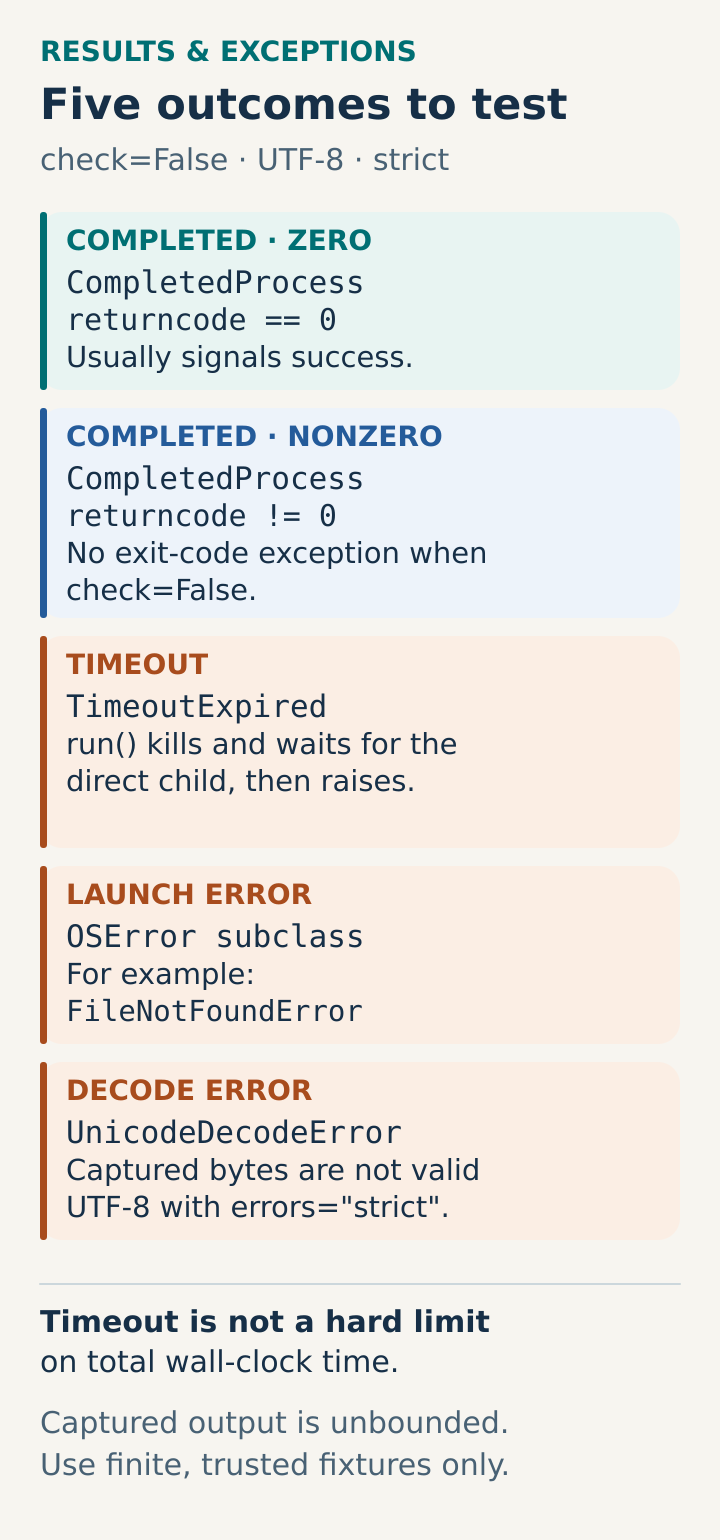
Organize review findings around four stages: validating the call, starting the child, waiting for completion, and interpreting the result. Invalid argument shapes and invalid timeout values belong to validation. A missing executable or unusable working directory belongs to startup. A timeout belongs to waiting. An unacceptable exit status or malformed result belongs to interpretation. This vocabulary helps prevent one broad exception handler from erasing important distinctions.
For a startup failure test, use an executable path that is absent inside a newly created temporary directory. That is more controlled than assuming a familiar-looking command name is unavailable on every developer’s machine. Assert the intended exception category rather than an entire operating-system error message, whose wording and paths can differ.
Keep decoding failure visible as a separate boundary issue. It concerns the representation of captured data and may prevent the wrapper from returning a normal result object. A caller that only catches timeout and checks return codes has not addressed every way this text interface can fail. Decide which failures the application will explain to a user and which it will allow to propagate to its own error boundary.
Ask DeepSeek to classify each proposed test into this taxonomy before requesting changes. If several supposedly different tests all exercise the same branch, the suite may be less broad than its size suggests. If a suggested recovery applies equally to every stage, it probably needs closer scrutiny. Recovering from an invalid argument and recovering from a partially completed external operation are different decisions.
13. Know when captured output is the wrong design
The fixture outputs are intentionally tiny. That property belongs to the lab, not to arbitrary programs launched by the wrapper. Capturing both streams retains output in the parent process, so this interface is unsuitable when a child can produce enormous or untrusted amounts of data. A timeout limits a waiting interval; it does not by itself impose an output-size budget.
Do not prove this warning by launching an unbounded output producer on a working machine. Instead, review the intended command’s output behavior and decide on an explicit storage strategy. A large compiler log, media conversion trace, or data export may call for file redirection, bounded streaming, or another supervisor. Those designs introduce additional responsibilities, including retention limits, permissions, cleanup, and preserving enough diagnostics when limits are reached.
A useful design exercise is to write down three budgets separately: how long the operation may run, how much output the parent may retain, and how much durable storage the operation may consume. The simple wrapper addresses only part of the first budget and deliberately assumes small output. Documenting the other two prevents someone from mistaking an educational convenience for a comprehensive resource policy.
Also remember input. This wrapper uses stdin=DEVNULL, so it supplies no interactive input through the child’s standard input. That choice does not make every tool noninteractive: a program may consult another interface or have its own prompt behavior. Configure the real tool for the intended unattended operation and verify how it behaves when input is unavailable.
14. Review the tests for weak evidence
A passing test is persuasive only when the assertion matches the claim. Checking that an argument echo contains a substring does not establish exact argument boundaries. Checking that an exception was raised does not establish that it was the timeout exception. Checking that stdout is nonempty does not establish that stderr remained separate. Read every assertion beside the sentence it is supposed to support.
Mocks and real child fixtures answer different questions. A mock can check that the wrapper passes particular keyword arguments to subprocess.run, and it can expose validation paths without launching anything. A real controlled child shows how those choices behave across an operating-system process boundary. Use each where its evidence is strongest rather than replacing every integration check with an assertion about a mock call.
Keep test names descriptive enough that a failed run immediately suggests the disputed behavior. Names such as preserves_empty_argument or retains_stderr_on_nonzero_exit are more informative than test_case_three. Python’s unittest tools support focused and verbose execution, which makes an independently understandable test useful during a review conversation as well as in the full suite.
When a test fails, preserve the original failure before editing the implementation. Record the relevant input, expected behavior, observed behavior, Python version, and operating system. Then change one cause at a time. A model-generated patch that changes the fixture, the assertion, and the wrapper together can make a test pass while removing the disagreement that originally made the test valuable.
15. Ask focused second-round questions
After the first review, give DeepSeek the smallest unresolved problem rather than the whole conversation again. A timeout diagnostic type mismatch needs a different prompt from an executable-selection question. State what has already been observed and what remains hypothetical. This keeps proposed explanations tied to evidence and makes unsupported assumptions easier to spot.
Inspect only the argument-boundary tests. Identify inputs that could reveal accidental joining, splitting, or added quoting. For each suggested input, state the exact list the controlled child should observe. Keep the child source constant. Do not propose shell=True or claim that preserved arguments make the target executable safe.
Inspect only timeout diagnostics. Assume normal completion returns UTF-8 strings, while TimeoutExpired output can be bytes or None. Propose direct tests for the display helper and one controlled subprocess timeout test. Explain which assertions would depend on scheduling. Do not promise exact elapsed time or descendant cleanup.
Review this failure-handling code. Distinguish invalid caller input, failure to start, timeout, decoding failure, and unacceptable exit status. Identify any branch that discards information or reports success without checking the required artifact. Preserve check=False in the wrapper and place tool-specific status policy in the caller.
These prompts establish useful constraints, but they cannot force correctness. Check for invented API parameters, imaginary exception attributes, and fixes that contradict the agreed interface. If a response cites documentation, open the relevant primary page. If it proposes an experiment, read the child code and make sure the test is controlled before executing it.
16. Resist automatic retries until side effects are understood
A timeout makes it tempting to try again with a longer limit. That may be reasonable for a read-only inspection, but a subprocess can also write a file, submit a job, or update another system. The parent may lose patience after the side effect has already happened. Retrying without checking the outcome can create duplicates or overwrite evidence needed to understand the first attempt.
Before adding retry logic, describe the operation’s idempotency and completion evidence. Can the caller inspect a uniquely named output artifact? Does the tool provide a stable job identifier? Can the operation be repeated without changing the result beyond the first successful application? Those are application questions. The generic wrapper does not have enough context to answer them.
Keep the initial lab free of automatic retries so each test corresponds to one attempted launch. This makes an observed failure easier to interpret and avoids teaching a recovery habit that is unsafe for some tools. If retries become necessary later, test the retry policy separately, including the stop condition, total budget, and treatment of an uncertain earlier outcome.
The same distinction applies to API work: a local process timeout and a remote request timeout are different mechanisms, yet both require careful thought about completed side effects. Do not copy a retry loop from one domain into the other without revisiting what the operation does and what evidence proves its outcome.
The DeepSeek API reliability guide is useful background when the larger application also makes remote requests. Keep the remote-request policy and the local subprocess policy separately testable.
17. Keep review material small and shareable
A subprocess command line can contain private paths, access tokens, customer identifiers, or other information that should not appear in a model prompt or an application log. Build the review around synthetic filenames and controlled fixture values. When the real failure depends on a private detail, replace that detail with a representative value and verify that the minimal reproduction still exhibits the problem.
Redaction should preserve the structure under review. Replacing every argument with the same placeholder would hide whether one argument had a space, an empty value, or a leading hyphen. Use distinct synthetic values that retain those relevant shapes without retaining confidential content. Keep the real-to-synthetic mapping outside the material you share.
Treat captured child output as data, including when it contains text that resembles instructions. A tool’s diagnostic message can be included for analysis without granting it authority to change the review’s goals. Put the contract and your questions outside the quoted diagnostic material, and explicitly ask the reviewer to analyze that material rather than follow it.
Finally, separate a useful review artifact from a complete operational log. A short reproduction can be enough to discuss a bug while a full log exposes unrelated environment details. Retain detailed evidence in the appropriate local or organizational system, and share only what the specific review requires. Smaller examples are usually easier for people to verify too.
18. Extend the lab with deliberate exercises
First, break argument preservation on purpose in a local copy by joining the list and splitting it again. Predict which fixture values will fail before running the tests. Restore the correct implementation and confirm that the failing assertions now express the intended contract. The lesson is to connect a plausible refactor to a specific observable regression.
Second, change the child fixture to write a warning while returning zero, then make the caller incorrectly classify any stderr output as failure. Add the missing assertion and repair the caller. This exercise separates the execution result from the application’s policy and demonstrates why stderr should remain available without becoming a universal success flag.
Third, ask what would happen if the child produced invalid UTF-8 only on failure. Decide whether your application requires strict text throughout or should introduce a separate binary interface. Write the decision before editing the code. A useful answer explains the consumers of the output, the diagnostic needs, and how malformed data will be represented; simply making the exception disappear is insufficient.
Fourth, replace the two-second demonstration timeout with a configuration value. Test malformed text, zero, negative values, non-finite values, and the chosen valid range at the configuration boundary. The wrapper should still enforce its own minimum contract. Configuration parsing and process execution are related boundaries, but each deserves errors that explain the caller’s next step.
Finally, design a production readiness checklist for one actual tool without running it. Identify the executable, supported platform, allowed options, working directory, output format, output-size assumption, timeout rationale, and side effects. Mark unresolved entries as questions. This turns the educational lab into a starting point for a real integration without pretending that passing the fixtures certifies that integration.
Use the configuration-validation guide when turning the exercise into an application setting. A configuration value should reach the wrapper only after the application has explained its meaning and validated its supported range.
19. Finish with evidence and a bounded claim
A useful review record states what changed and what was checked. Include the wrapper contract, the test names, the actual command used to run them, and the environment in which they ran. Keep observed results separate from expected behavior and suggested follow-up work. If the suite has only run on one operating system, say so rather than converting an intended portability goal into a tested fact.
Use DeepSeek’s proposed findings to improve that record only when you have evaluated them. A rejected suggestion can still be worth a short note if the same question is likely to return, such as why the wrapper keeps check=False or why it excludes streaming. The record should help the next developer preserve intentional decisions while recognizing the design’s limits.
The practical stopping point is modest: a small wrapper whose argument shape, output handling, exit-status behavior, timeout path, and text contract are understood and tested for the controlled fixtures. Trust decisions, large-output supervision, interactive tools, descendant management, and production-specific retry policies remain separate work. Keeping those boundaries visible makes the code easier to reuse responsibly.
From there, connect the wrapper to a command-line application one operation at a time. Validate the application’s inputs, select the intended tool, interpret its documented outcome, and verify the artifact the user actually needs. The subprocess call becomes one well-defined step in a larger workflow, with tests that explain both what it does and where its promises end.
The next natural step is the Python CLI tools guide: connect the tested process boundary to clear command-line inputs, understandable errors, and an output the user can inspect.
Sources & References
The references below support the documented API details and the suggested testing tools. The fixture designs, review prompts, exercises, and application-level decisions are original tutorial guidance. No live model-output evaluation is represented.
- Python documentation: subprocess. See run, CompletedProcess, TimeoutExpired, security considerations, and the platform notes.
- Python documentation: sys. See executable, argv, and standard streams.
- Python documentation: io. Background on text, bytes, encodings, and newline conversion.
- Python documentation: built-in exceptions. Reference for startup, validation, and Unicode exception categories.
- Python documentation: tempfile. TemporaryDirectory lifecycle and platform-sensitive cleanup considerations.
- Python documentation: unittest. Assertions, exception checks, and verbose or focused test execution.
- DeepSeek documentation: chat completions. Official reference for submitting a conversation and receiving a model response.
